Cyber insurance readiness means your business can show that the right protections are in place before you apply for coverage, renew a policy, or answer a security questionnaire. It also helps reduce the risk of higher premiums, exclusions, coverage delays, or claim issues after an incident.
For Ontario businesses, this matters even more because many organizations also handle personal information subject to Canadian privacy obligations. PIPEDA applies to private-sector organizations across Canada that collect, use, or disclose personal information during commercial activity, and organizations must keep records of every breach of security safeguards involving personal information under their control.
Cyber insurance is no longer a simple checkbox for businesses. Insurers are asking harder questions, requesting proof, and looking closely at how well your company protects its users, devices, data, cloud systems, and backups.
For many small and mid-sized businesses, the problem is not that they have no cybersecurity in place. The problem is that their security controls are incomplete, undocumented, untested, or difficult to prove.
That is where cyber insurance readiness matters.
What Is Cyber Insurance Readiness?
Cyber insurance readiness is the process of preparing your IT environment, policies, records, and security controls so your business can confidently apply for or renew cyber insurance.
It usually includes:
| MFA on key systems and remote access | Access control |
| Endpoint protection or EDR across workstations and servers | Security awareness training |
| Secure, tested backups | Written cybersecurity policies |
| Patch management | Incident response planning |
| Email protection | Proof that controls are active and monitored |
The Canadian Centre for Cyber Security recommends baseline cybersecurity controls for small and medium organizations to help reduce exposure and improve resilience. Its guidance is built around practical controls that small and mid-sized organizations can implement without enterprise-level complexity.
NIST’s Cybersecurity Framework also organizes cybersecurity around Govern, Identify, Protect, Detect, Respond, and Recover functions, which aligns closely with what insurers want to see: not just prevention, but the ability to detect incidents, respond quickly, and recover operations.
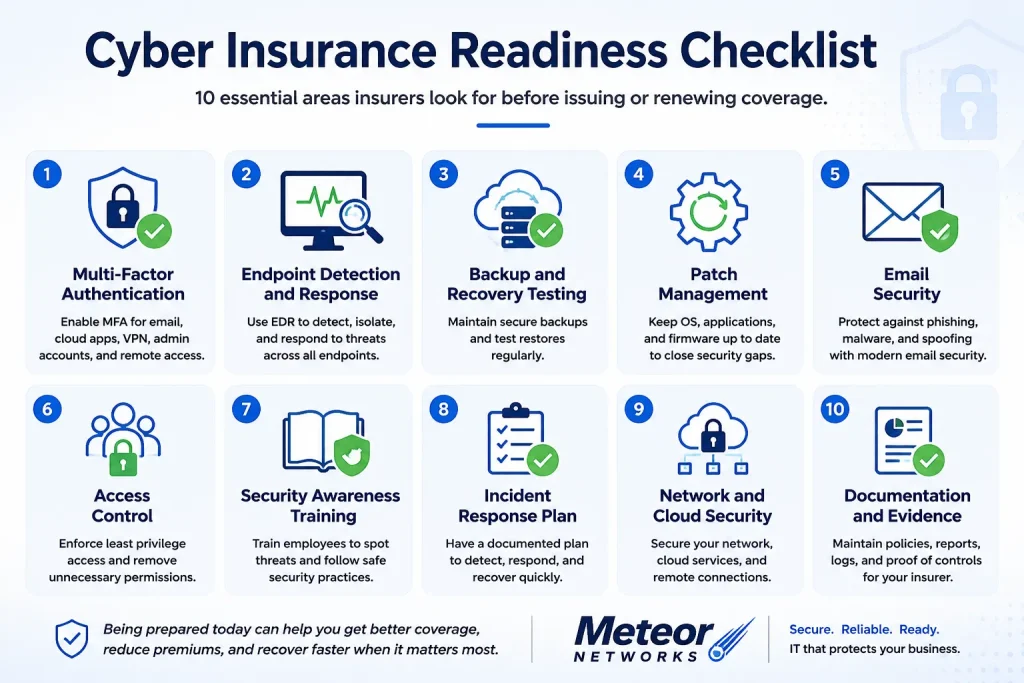
Cyber Insurance Readiness Checklist
1. Multi-Factor Authentication
Multi-Factor Authentication
MFA is one of the most common cyber insurance requirements. It should be enabled for email, Microsoft 365, VPN, remote access, cloud applications, administrator accounts, and any system that stores sensitive business data.
Do not assume MFA is complete just because it is turned on for email. Insurers may ask whether MFA applies to all users, all privileged users, all remote access, and all cloud services.
What to prepare:
- MFA policy
- List of covered systems
- Admin account MFA proof
- Remote access MFA proof
- Screenshots or reports from Microsoft 365, VPN, or identity tools
2. Endpoint Detection and Response
Endpoint Detection and Response
Basic antivirus may not be enough for modern cyber insurance requirements. Many insurers want to see stronger endpoint protection that can detect suspicious activity, isolate threats, and alert your IT team.
Endpoint Detection and Response, often called EDR, helps monitor workstations and servers for threats that may bypass older security tools.
What to prepare:
- Endpoint inventory
- EDR deployment report
- Server coverage report
- Alert monitoring process
- Remediation records
3. Backup and Recovery Testing
Backup and Recovery Testing
Backups are one of the most important parts of cyber insurance readiness because ransomware attacks often target business data and backup systems.
Having backups is not the same as being ready to recover. Your business should know where backups are stored, how often they run, whether they are protected from ransomware, and when the last restore test was completed.
The Canadian Centre for Cyber Security includes data backup and recovery as part of its baseline controls for small and medium organizations.
What to prepare:
- Backup schedule
- Backup success reports
- Restore test records
- Recovery time expectations
- Protected or separated backup storage details
4. Patch Management
Patch Management
Insurers want to know whether your business keeps systems updated. Unpatched software can leave known security holes open for attackers.
Patch management should cover workstations, servers, operating systems, business applications, firewalls, switches, cloud systems, and remote access tools.
What to prepare:
- Patch policy
- Patch reports
- Exception list
- Device inventory
- Critical update response process
5. Email Security
Email Security
Email remains one of the most common entry points for phishing, ransomware, invoice fraud, and credential theft. Cyber insurance applications often ask about spam filtering, phishing protection, email authentication, and security awareness.
Your business should also review SPF, DKIM, and DMARC records. These help reduce email spoofing and protect your domain from being abused in impersonation attempts.
What to prepare:
- Email filtering settings
- Microsoft 365 security settings
- SPF, DKIM, and DMARC status
- Phishing training records
- User reporting process
6. Access Control
Access Control
Cyber insurance readiness requires more than passwords. Businesses need to show that users only have the access they need, admin rights are limited, and former employees are removed quickly.
Shared admin accounts, stale accounts, and excessive permissions are common red flags.
What to prepare:
- User access review
- Admin account list
- Offboarding process
- Password policy
- Role-based permission structure
7. Security Awareness Training
Security Awareness Training
Employees are part of the risk picture. Insurers often ask whether staff receive cybersecurity training, especially around phishing, passwords, suspicious links, wire fraud, and data handling.
Training should be recurring, tracked, and easy to prove.
What to prepare:
- Training completion records
- Phishing simulation results
- Security policy acknowledgement
- New employee onboarding checklist
8. Incident Response Plan
Incident Response Plan
A written incident response plan shows insurers that your business knows what to do when something goes wrong.
This plan should explain who is responsible, who must be contacted, how systems are isolated, how evidence is preserved, how recovery starts, and how insurance, legal, and privacy obligations are handled.
This is especially important for Canadian businesses that handle personal information. Under PIPEDA, organizations must report breaches to the Privacy Commissioner and notify affected individuals when a breach creates a real risk of significant harm. Organizations must also maintain breach records.
What to prepare:
- Incident response plan
- Contact list
- Cyber insurance contact process
- Legal and privacy notification steps
- Tabletop exercise notes
9. Network and Cloud Security
Network and Cloud Security
Insurers may ask how your network is protected, especially if your business supports remote work, cloud applications, guest WiFi, or multiple locations.
This includes firewalls, secure remote access, network segmentation, logging, cloud security settings, and monitoring.
What to prepare:
- Firewall configuration summary
- VPN or secure remote access settings
- Cloud security review
- Network diagram
- Remote work policy
10. Documentation and Evidence
Documentation and Evidence
The biggest mistake many businesses make is assuming that installed tools are enough. Cyber insurance applications increasingly require proof.
A strong readiness package should include reports, policies, screenshots, logs, diagrams, inventories, and written procedures. MCC’s readiness page also emphasizes the need to collect evidence such as MFA deployment, backup reports, and vulnerability scans.
What to prepare:
- Security control summary
- Asset inventory
- Policy documents
- MFA reports
- Backup reports
- Patch reports
- EDR reports
- Training records
- Incident response plan
- Renewal notes
Why Businesses Struggle With Cyber Insurance Applications
Many businesses only start thinking about cyber insurance readiness when the broker sends a questionnaire. By then, the deadline is already close, and the questions can expose gaps that were never documented.
Common issues include:
MFA is not fully deployed:
MFA is not fully deployed
It may be enabled for Microsoft 365 but missing from VPN, remote desktop, admin accounts, accounting software, or privileged systems.
Backups exist but have not been tested:
Backups exist but have not been tested
Insurers often want to know whether backups are separated, protected from ransomware, and regularly restored.
Antivirus is outdated:
Antivirus is outdated
Many insurers now expect stronger endpoint protection, such as EDR, rather than basic antivirus alone.
No written incident response plan exists:
No written incident response plan exists
Businesses may know who to call internally, but they do not have a documented process for containment, communication, recovery, legal notification, and insurance reporting.
Access rights are too broad:
Access rights are too broad
Former employees, shared admin accounts, unused accounts, and excessive permissions increase risk.
There is no evidence:
There is no evidence
Even when controls are in place, businesses may not have screenshots, reports, policies, logs, or configuration records to support their answers.
Why “Yes” on the Application Is Not Enough
Cyber insurance questionnaires can look simple, but the answers carry risk.
If an application asks whether MFA is enabled, the insurer may expect MFA across all required systems, not just email. If the application asks whether backups are tested, the insurer may expect documented restore tests, not just backup software showing green checkmarks.
This matters because incorrect or unsupported answers can create problems later. Tier 3 IT warns that insurers may deny claims or increase premiums when poor cyber defences create a higher-risk profile or breach insurance expectations.
A better approach is to treat the cyber insurance application as an audit of your security posture. Before answering, confirm the control exists, confirm it covers the right systems, and collect proof.
How Meteor Networks Helps Businesses Get Cyber Insurance Ready
Meteor Networks helps Ontario businesses prepare for cyber insurance applications and renewals by reviewing the security controls insurers commonly ask about, closing technical gaps, and organizing the proof needed to answer questionnaires accurately.
Our cyber insurance readiness support can include:
Cybersecurity assessment
We review your users, devices, Microsoft 365 environment, network, remote access, backups, endpoint protection, and policies.
Gap report
We identify what is missing, incomplete, outdated, or difficult to prove.
Remediation plan
We help prioritize the controls that matter most for insurance readiness and real-world risk reduction.
MFA and access control cleanup
We help enforce MFA, reduce unnecessary admin access, and remove stale accounts.
Backup and recovery review
We verify backup coverage, review recovery expectations, and help document restore testing.
Endpoint and monitoring improvements
We help strengthen workstation and server protection using modern security tools.
Policy and documentation support
We help organize the evidence insurers may request, including reports, screenshots, policies, and technical summaries.
Renewal readiness
Cyber insurance requirements can change from year to year. We help keep your business ready before the next renewal deadline.
Meteor Networks is not an insurance broker and does not sell cyber insurance policies. Our role is to help your IT environment meet stronger security expectations so you can have more confident conversations with your broker, insurer, and leadership team.

Cyber Insurance Readiness FAQ
Common requirements include MFA, endpoint protection, secure backups, patch management, email security, access control, employee training, incident response planning, and proof that controls are active.
Yes. Small and mid-sized businesses are often asked the same types of security questions as larger companies, but they may not have internal IT teams to gather the evidence or close gaps quickly.
Coverage may be delayed, limited, priced higher, or declined if the business cannot meet insurer expectations. Claims can also become difficult if application answers are inaccurate or unsupported.
No. Cyber insurance helps transfer some financial risk after an incident. Cybersecurity helps reduce the chance and impact of an incident. Insurers increasingly expect both.
At minimum, review readiness before every policy renewal. A better approach is to review quarterly, especially after major staff changes, new software, cloud changes, remote work changes, or security incidents.
Book a Cyber Insurance Readiness Assessment
Cyber insurance readiness is not just about getting approved. It is about knowing your business can prevent common attacks, respond quickly, recover operations, and prove that the right controls are in place.
Meteor Networks helps Ontario businesses prepare before the insurance questionnaire becomes urgent.
Book a Cyber Insurance Readiness Assessment with Meteor Networks to identify gaps, strengthen your controls, and prepare the evidence your insurer may request.