
An MSP manages and supports a business’s IT systems on an ongoing basis. This usually includes help desk support, network monitoring, cybersecurity, patching, backups, cloud management, and technology planning. Instead of waiting for something to break, an MSP helps prevent problems, reduce downtime, improve security, and make IT easier to manage.
For many small and mid-sized businesses, IT becomes a problem only when something breaks. A server goes down. Email stops working. A laptop gets infected. A staff member cannot access an important file. Suddenly, the entire business is waiting on technology to catch up.
That is where an MSP comes in.
For Ontario businesses, an MSP can act as an outsourced IT department or an extension of an internal team. The goal is simple: keep your systems running, protect your business from avoidable risks, and support your team with fewer technology disruptions.
What Is an MSP?
An MSP is a third-party provider that delivers ongoing IT services such as network management, infrastructure support, cybersecurity, help desk support, cloud management, and system maintenance. Managed services are typically provided through regular support, active administration, and defined service expectations rather than one-time repair work.
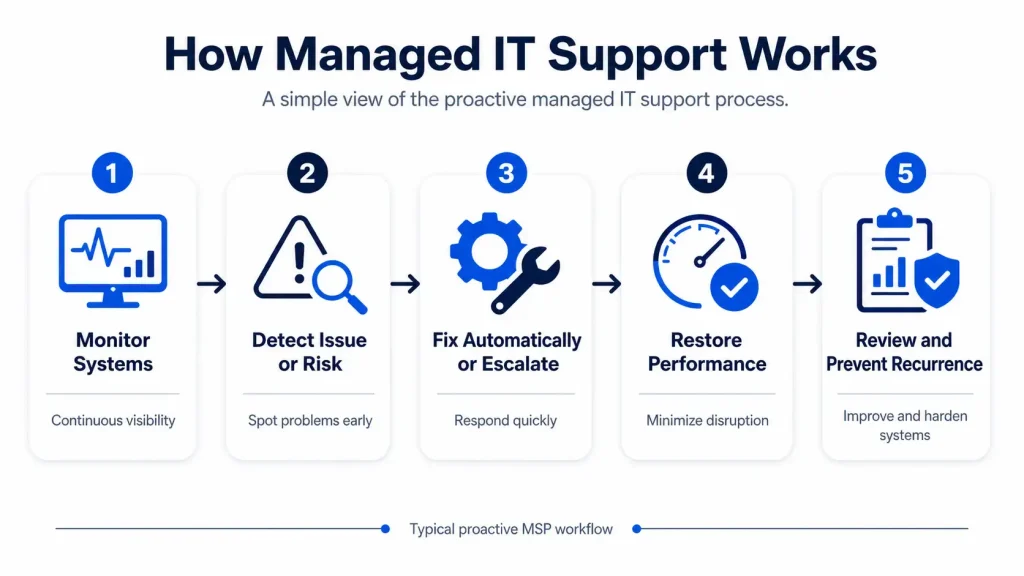
In practical terms, an MSP helps businesses answer questions like:
- Can our staff get help when something stops working?
- Are our devices and systems being monitored?
- Are security updates being applied?
- Are backups running properly?
- Are we protected if a server, laptop, or cloud account is compromised?
- Do we have a plan if our business is hit by a cyberattack?
A good MSP does more than fix technical issues. It helps create a more reliable, secure, and manageable IT environment.
What Does an MSP Do?
An MSP manages the day-to-day technology needs of a business. The exact services depend on the provider and the client’s needs, but most MSPs support several core areas.

1. Help Desk and User Support
One of the most visible things an MSP does is provide support for employees. This may include help with:
- Login issues
- Email problems
- Printer access
- Software errors
- Device troubleshooting
- Password resets
- Microsoft 365 or Google Workspace support
- Remote work access
Instead of having staff waste time trying to solve IT problems alone, they can contact the MSP for support. This helps reduce downtime and keeps employees focused on their work.
2. Network Monitoring and Maintenance
An MSP monitors important systems such as servers, firewalls, switches, access points, workstations, and cloud environments. The purpose is to identify problems before they become major disruptions.
For example, an MSP may detect that a server is running out of storage, a device is offline, or a security update has failed. That allows the issue to be addressed before it affects the entire business.
This proactive approach is one of the biggest differences between managed IT services and traditional break-fix IT support.
3. Cybersecurity Support
Cybersecurity is now one of the most important parts of managed IT services. MSPs often help businesses put stronger protections in place, including endpoint protection, firewall management, patching, multi-factor authentication, email security, backup protection, and user awareness support.
CISA has published guidance for MSPs and their customers because managed service relationships can affect cyber risk for both sides. The agency recommends that organizations consider cybersecurity expectations, contractual protections, and shared responsibilities when working with an MSP.
For small and mid-sized businesses, this matters because many do not have a full in-house cybersecurity team. An MSP can help close that gap by improving the basics and building a more structured security posture.
4. Software Updates and Patch Management
Outdated software can create serious security and performance risks. An MSP helps manage updates across computers, servers, operating systems, and supported applications. Patch management may include:
- Reviewing available updates
- Testing or scheduling patches
- Applying critical security updates
- Monitoring failed updates
- Reducing exposure to known vulnerabilities
This is especially important for businesses that handle customer data, employee records, payment information, or other sensitive information.
5. Backup and Disaster Recovery
An MSP helps businesses prepare for data loss, system failure, ransomware, accidental deletion, or hardware issues. Backup and disaster recovery support can include:
- Setting up automated backups
- Monitoring backup success or failure
- Testing data recovery
- Creating recovery plans
- Protecting cloud and on-premise systems
- Reducing the impact of downtime
A backup is only useful if it works when you need it. An MSP helps make sure backups are not just configured, but also monitored and recoverable.
6. Cloud and Microsoft 365 Management
Many businesses now rely on cloud tools such as Microsoft 365, Google Workspace, cloud storage, cloud servers, hosted applications, and VoIP phone systems.
An MSP can help manage cloud environments by handling user access, security settings, licensing, migrations, backups, and configuration. IBM describes managed cloud services as the complete or partial management and control of a client’s cloud resources, including areas like migration, optimization, security, configuration, upgrades, and maintenance. (IBM)
For businesses, this means fewer configuration headaches and better control over cloud tools.
7. IT Strategy and Planning
An MSP should not only respond to tickets. It should also help the business plan ahead. This may include:
- Reviewing aging hardware
- Planning software upgrades
- Improving cybersecurity
- Supporting office moves
- Preparing for growth
- Budgeting for IT needs
- Recommending better systems
- Aligning technology with business goals
This is where an MSP becomes more than a support vendor. It becomes a technology partner.
MSP vs. Break-Fix IT Support
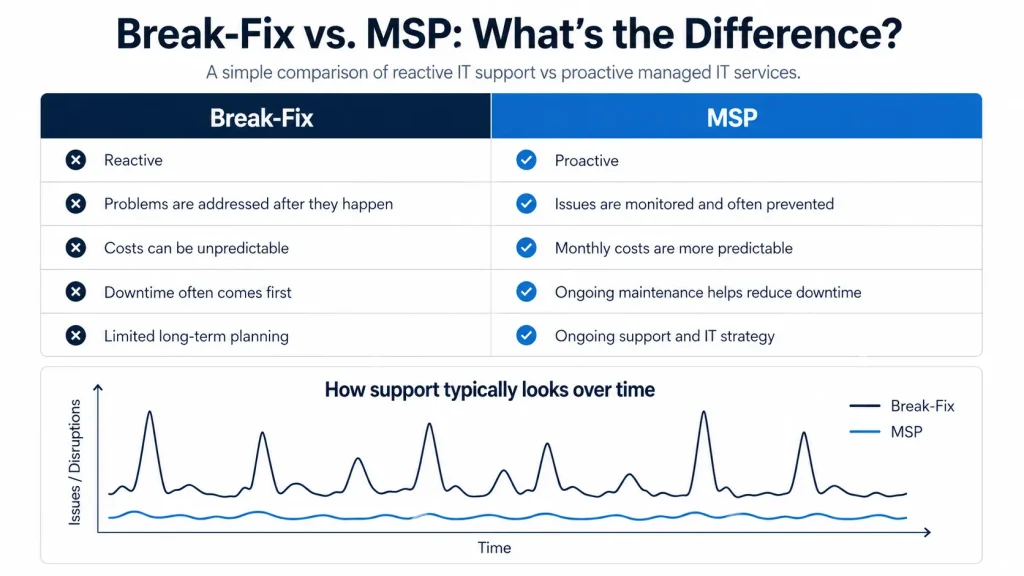
Traditional break-fix IT support works like this: something breaks, the business calls for help, and the provider bills for the repair.
Managed IT services work differently. The MSP provides ongoing monitoring, support, maintenance, and planning for a predictable monthly cost.
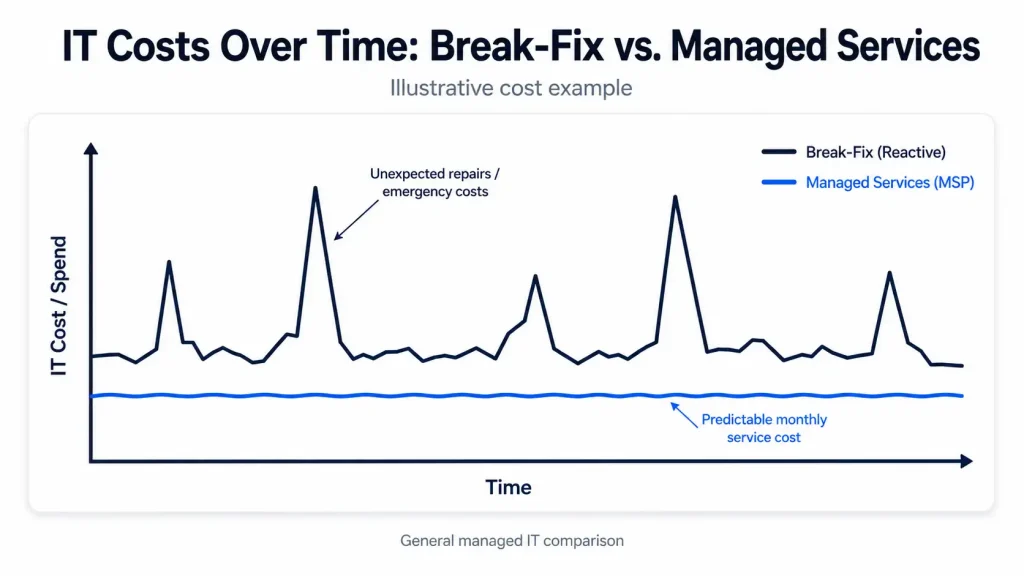
Break-fix IT is reactive. Managed IT is proactive.
That difference matters because many IT problems are easier and less expensive to prevent than they are to fix after they interrupt the business.
MSP vs. Internal IT Team
An MSP does not always replace internal IT. In many businesses, it supports the internal team.
There are two common models:
- Fully managed IT: The MSP handles most or all IT responsibilities for the business.
- Co-managed IT: The MSP works alongside an internal IT person or department, often helping with overflow support, cybersecurity, monitoring, projects, or specialized expertise.
For growing Ontario businesses, co-managed IT can be useful when the internal team is stretched thin but the business is not ready to hire multiple full-time specialists.
Why Do Businesses Use an MSP?
Businesses often work with MSPs because they need more reliable IT support, stronger security, and better planning without hiring a full internal IT department.
Common reasons include:
- Reducing downtime
- Improving cybersecurity
- Getting faster employee support
- Making IT costs more predictable
- Supporting remote or hybrid workers
- Managing Microsoft 365 or cloud tools
- Meeting cyber insurance requirements
- Improving backup and recovery readiness
- Supporting growth without overloading internal staff
For many SMBs, an MSP provides access to a broader IT skill set than they could realistically hire in-house.
How an MSP Helps With Security and Compliance
An MSP cannot “guarantee compliance,” but it can help businesses put stronger safeguards, documentation, and technical controls in place.
In Canada, PIPEDA requires organizations to protect personal information with safeguards appropriate to the sensitivity of that information. The Office of the Privacy Commissioner of Canada lists examples such as passwords, encryption, firewalls, security patches, access limits, staff training, and organizational controls. (Office of the Privacy Commissioner)
For businesses that handle customer or employee information, an MSP can help support these safeguards through better access management, device protection, patching, backups, and security policies.
This is especially important for industries such as healthcare, education, logistics, hospitality, and professional services, where downtime and data exposure can create serious business risks.
What Services Should You Expect From an MSP?
A strong MSP offering usually includes a mix of support, monitoring, security, and strategy. Here are common services to look for:
| Managed IT support | Microsoft 365 support |
| Help desk services | Backup and disaster recovery |
| Network monitoring | Cloud management |
| Server management | Vendor coordination |
| Cybersecurity support | IT consulting and planning |
| Firewall management | Remote work support |
| Endpoint protection | Business phone system support |
| Patch management |
Not every MSP offers the same service level, so it is important to ask what is included, what is optional, and what response times are defined in the agreement.
Signs Your Business May Need an MSP
Your business may be ready for an MSP if:
- Staff regularly lose time because of IT issues
- You rely on one person for all technology problems
- Backups are not being tested
- Cybersecurity is mostly informal
- Devices are not consistently updated
- You are unsure who manages Microsoft 365 security
- Your business has grown beyond basic IT support
- You need help meeting cyber insurance requirements
- You want more predictable IT costs
- You do not have a clear disaster recovery plan
The earlier these issues are addressed, the easier they are to manage.
What Makes a Good MSP?
A good MSP should be proactive, transparent, security-focused, and aligned with your business goals.
Look for a provider that can explain:
| What is included in the monthly service |
| How support requests are handled |
| What response times are expected |
| How systems are monitored |
| How cybersecurity is managed |
| How backups are tested |
| What reports or reviews are provided |
| How they support future planning |
| How they communicate during issues |
The best MSP relationship is not just technical. It should give your leadership team more confidence in how technology is being managed.
How Meteor Networks Helps Ontario Businesses
Meteor Networks provides managed IT services for Ontario businesses that need reliable support, stronger security, and practical technology planning.
Our team helps businesses manage day-to-day IT needs while also improving long-term reliability. That includes support for users, networks, cybersecurity, Microsoft 365, backups, cloud systems, and business technology planning.
Whether your business needs fully managed IT support or extra help for an internal team, Meteor Networks can help you build a more dependable IT environment.
For Ontario businesses, the right MSP can provide the structure, support, and expertise needed to keep technology working in the background so the business can stay focused on serving customers.
Need reliable managed IT support for your business?
Contact Meteor Networks to learn how we can help protect, support, and simplify your IT environment.